Originally published on Ubuntu Discourse on 10 November 2026.
We are happy to announce that the newly released Ubuntu 26.10 Stonking Stingray ships curl with upki revocation checking built in. This is the very first step towards browser-grade certificate verification across the entire OS.
Take a quick look:
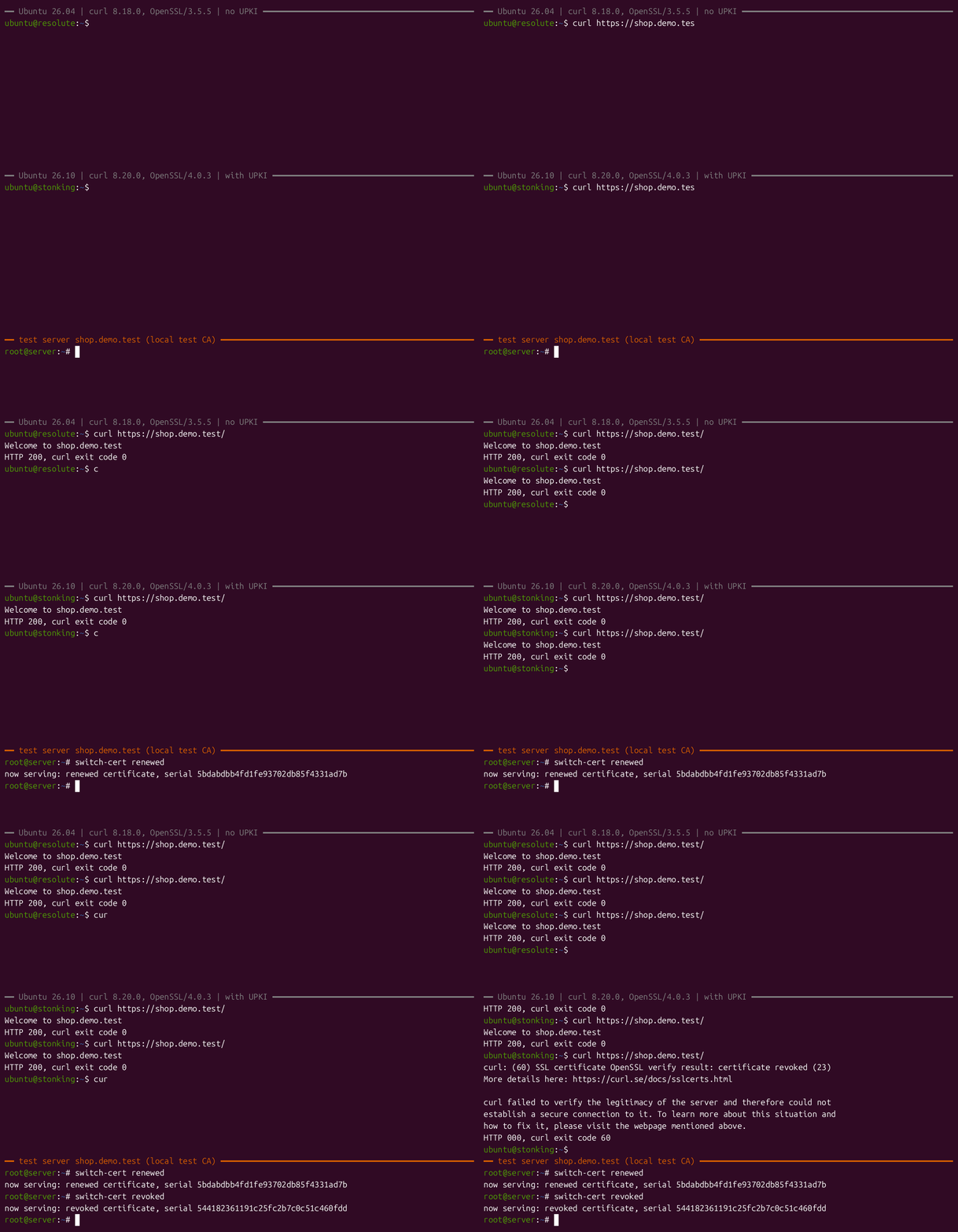
- Top: Previous release (Ubuntu 26.04 Resolute Raccoon)
- Middle: Latest release (Ubuntu 26.10 Stonking Stingray)
- Bottom: Local test server that switches between test certificates
- The same
curlcommand is run on both releases. - The server first switches to a renewed certificate, then to a revoked one.
- 26.04 accepts the revoked certificate, 26.10 refuses it.
The demo uses a test CA and revocation data built with Mozilla’s CRLite tools. curl, OpenSSL and upki are the unmodified Ubuntu packages.
How it works
curl uses OpenSSL to verify the certificate chain, which by default does not check whether a certificate was revoked. In 26.10, curl adds this check with upki-openssl: it also checks the server certificate against a local dataset of revoked certificates. This is the same technology that Firefox uses.
There are no additional network calls for this, making it fast and private.
The upki package, a recommended dependency, provides a systemd timer that updates the revocation data in the background every 6 hours. Until the first update, curl works as before.
Try it yourself
Install (or upgrade to) Ubuntu 26.10 Stonking Stingray.
Install
upkiif it is not already installed:sudo apt install upkiRun the first fetch to populate the revocation data:
sudo systemctl start upki-fetch.serviceTry it out! A site with a revoked certificate refuses to connect:
$ curl https://revoked.badssl.com/
curl: (60) SSL certificate OpenSSL verify result: certificate revoked (23)
More details here: https://curl.se/docs/sslcerts.html

curl failed to verify the legitimacy of the server and therefore could not
establish a secure connection to it. To learn more about this situation and
how to fix it, please visit the webpage mentioned above.
Sites with non-revoked certificates work as before (you get a new joke each time):
$ curl https://icanhazdadjoke.comTo see the revocation status of any site:
curl -sw '%{certs}' https://ubuntu.com -o /dev/null | upki revocation check
Why revocation matters
On 17 October 2026, a researcher found that the private keys of eight of eMudhra’s intermediate CA certificates were cryptographically weak. One of the private keys was the number 4!
With such a key, an attacker can make a certificate for any website.
Firefox and Chrome blocked these intermediate certificates the same day, while most other applications had to wait for distributions to update their ca-certificates packages.
We need infrastructure that provides timely revocations across the whole OS. upki is being built to do exactly that.
What is next?
For 27.04, the Foundations team plans to integrate upki into Ubuntu’s OpenSSL so that its normal certificate verification also checks the upki revocation data. This would let most of the over 1,000 packages that use OpenSSL directly benefit from this revocation infrastructure, with no change to each one.
Thanks to Dirkjan and Joe (rustls), with special thanks to Joe for writing the curl integration, to @juliank and to everyone who contributed. This post follows @jnsgruk’s update on upki from February and the 26.04 preview from July.